TL;DR (too long; didn’t read):
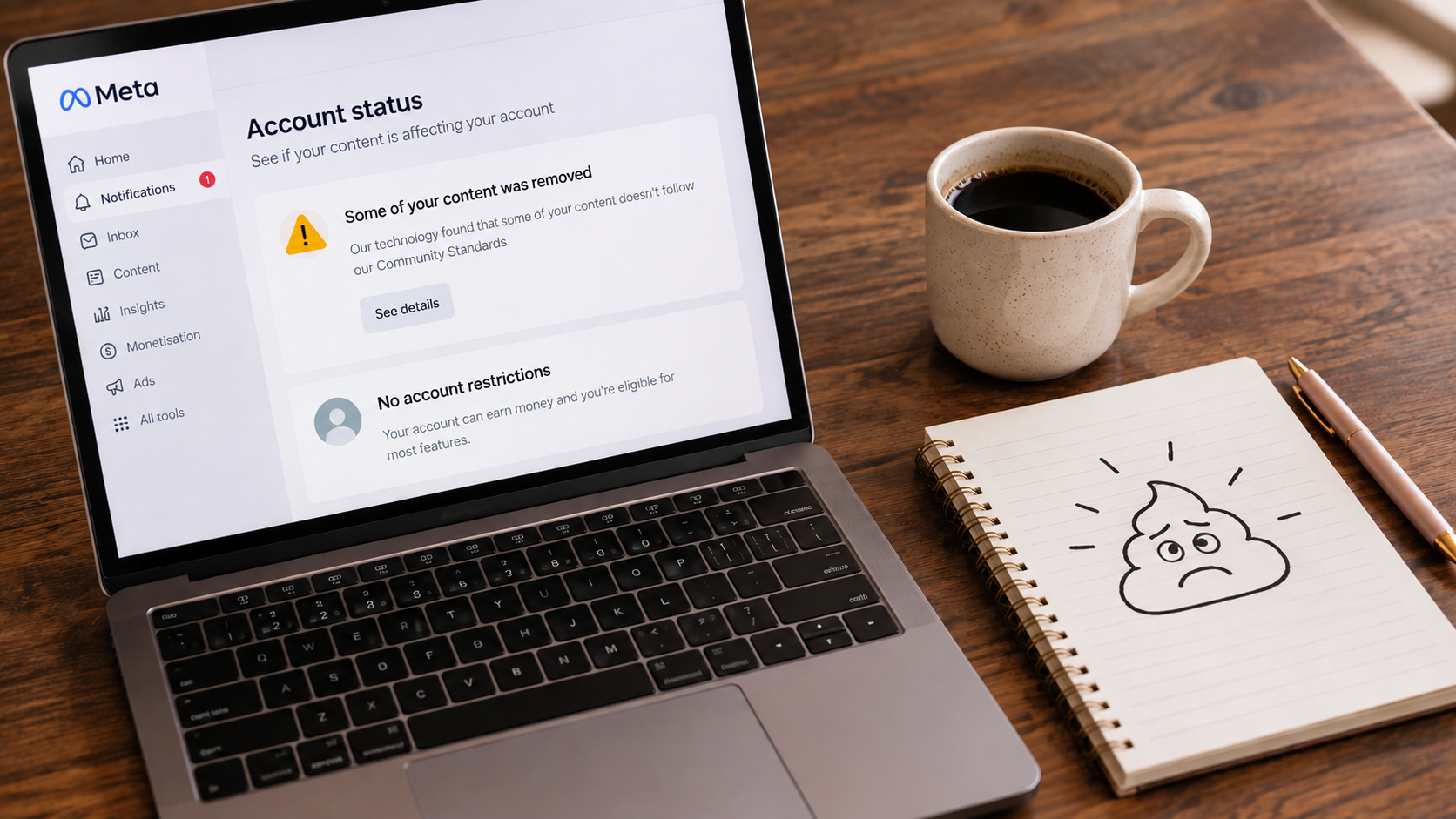
Meta has flagged your content? Slow down before you click, delete or appeal anything.
- Do not panic-delete everything. A warning does not always mean you have done something wrong, and some warnings are not from Meta at all.
- Check the warning is real first. Do not click the link in the message. Go straight to Instagram, Facebook, Meta Business Suite or Accounts Centre and look for the same issue in Account Status, Page Status or Business Support Home.
- Screenshot and record the warning before you change anything.
- Edit, delete, repost or leave it alone first, depending on what was flagged. Appealing is not the first step, and appealing before you have done this can be damaging to your account.
- Appeal only if Meta appears to have made a mistake and you have reviewed everything.
- Know the common triggers: copyright and music, strong claims, repeated wording, engagement bait, misleading links, private client details, unchecked AI content and missing disclosures.
- Reduce repeat warnings with a pre-post checklist, copies of your content outside Meta and a record of every warning.
There are few things more annoying than getting a warning from Meta.
One minute you are posting normal business content. The next, Instagram or Facebook is telling you something has been flagged, restricted, removed, limited or reviewed.
The first thing to know is this: do not panic-delete everything.
A Meta warning does not always mean you have done something terrible. Sometimes the issue is real. Sometimes it is wording, music, copyright, claims, links, hashtags, account behaviour or reused content. And sometimes it is not from Meta at all.
Before you click anything, appeal anything, delete anything, or start questioning every post you have ever published, slow down and check what is actually going on.
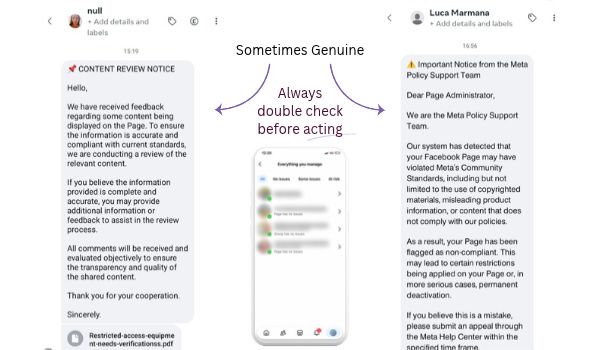
A warning can look official and still be fake. It can also look vague and still be real. That is why the first step is not trusting the logo, the panic in the message, or the big scary button. It is checking inside the account itself.
What does “flagged content” mean?
“Flagged content” can mean different things depending on where the warning appears and what Meta is objecting to.
Your content may have been:
- removed
- restricted
- made less visible
- blocked from recommendations
- affected by copyright or audio rights
- flagged for a community standards issue
- caught by an automated review
- linked to spammy behaviour
- affected by branded content, AI media or claims rules
- connected to a wider account, Page or profile issue
On Instagram, this might show up around Account Status, recommendation eligibility, a post, Reel, Story, comment or caption.
On Facebook, it may involve Page Status, Business Support Home, content quality, link behaviour, originality, engagement bait, Page restrictions or recommendation eligibility.
Same Meta universe. Slightly different mess.
First: check whether the warning is real
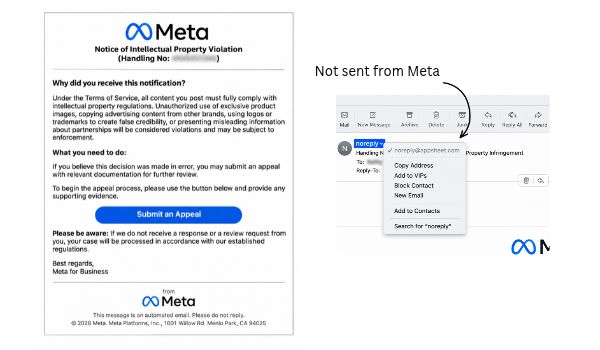
Before you click a link in an email, DM, notification or message, check whether the warning is actually from Meta.
Scam emails and fake Meta messages are common, and they are designed to make you act quickly. They might say your account will be deleted, your Page has violated policy, your business account will be disabled, or you need to appeal through a link before a deadline.
That pressure is the point.
Do not use the link in the message as your starting point. Go directly to Instagram, Facebook, Meta Business Suite or Accounts Centre yourself. Open the app or type the address into your browser instead of clicking through from the warning.
Then check whether the same issue appears inside your actual account.
For Instagram, check:
- Account Status
- Accounts Centre
- recent emails from Meta, where available
- in-app notifications
- whether the warning mentions a specific post, Reel, Story or comment
For Facebook, check:
- Page Status
- Meta Business Support Home
- recent emails from Meta
- Page notifications
- whether the warning mentions a specific post, Reel, link, asset or Page issue
If the message says something is wrong, but nothing appears inside your actual Meta account, treat it as suspicious.
Then check the right status area
If the warning appears to be real, check the right status area for the platform.
If it is Instagram
Go to:
Instagram profile → Menu → Settings and activity → Account Status
This is where Instagram usually shows issues connected to removed content, recommendation eligibility, restrictions, community guideline warnings and review options.
Look for:
- what content was flagged
- what rule or guideline Instagram mentions
- whether the content was removed or restricted
- whether your account has wider restrictions
- whether there is a review or appeal option
- whether the issue has already resolved
If it is Facebook
For Facebook Page content, check:
- Page Status
- Meta Business Support Home
- recent emails from Meta
- any available Learn More or See Details information
Look for:
- the notification date
- the sender
- the exact wording
- the affected asset, if Meta shows one
- any deadline
- whether a review or appeal option is available
- whether the issue affects the post, Page, distribution, monetisation or recommendation eligibility
For Facebook Page content, do not rely only on what you can see on the public post or Page. Some warnings may show in Page Status, Meta Business Support Home or account notifications even when the post itself does not look visibly restricted.
This is why checking the backend matters before you start deleting, reposting or changing everything.
Screenshot and record the warning before acting
Before you appeal, edit, delete or repost anything, record the details.
Screenshot:
- the warning
- the date
- the sender
- the exact wording
- the affected post, Reel, Story, comment, link or caption if shown
- any deadline
- any review or appeal option
- anything showing in Account Status, Page Status, Business Support Home or Accounts Centre
If Meta does not clearly identify the post or asset, review recent content around the notification date and since your last known clean check.
Look for patterns. Has the same word or phrase appeared across several posts? Have you reused the same caption, hashtag set, link wording or call to action? Is there music, a claim, a screenshot, a client detail, or AI-generated wording that might be causing the issue?
You are not looking for drama. You are looking for clues.
The goal is to understand the issue before deciding whether to appeal, edit, delete, repost or leave it alone.
Decide whether to appeal, edit, delete or leave it alone
Once you have checked whether the warning is real, reviewed the right status area and recorded the details, decide what the issue actually needs.
Appealing should not be your first step. Depending on what was flagged, the best first move is usually to edit the content, delete it, repost a corrected version or leave it alone. Appealing before you have done that can be damaging to your account. Work out what was flagged first, then choose the action that fits.
This is the part where a lot of business owners delete the post, repost the same thing, or start clicking every button Meta offers because surely one of them must help.
Start with the warning in front of you, not the panic around it.
Appeal it if Meta appears to have made a mistake and you have reviewed everything
Appeal or request a review only once you have worked through the steps above and checked the content properly. It makes sense if the content does not seem to break the rule mentioned, the warning affects your account or Page, the post has been removed unfairly, or Meta gives you a review option that makes sense to use.
Keep the appeal short, factual and calm.
Explain why you believe the content follows the relevant standard. Do not write an emotional novel to the robot. Tempting, but unlikely to help.
For Facebook Page content, Meta may only give you a broad category rather than a precise explanation. Record what you reviewed, what you believe happened, and why you think the content should be retained or restored. This matters even more if you manage content for clients.
Edit it if the issue is fixable
Sometimes the content does not need to be deleted. It just needs to be adjusted.
Editing may make sense if the issue is connected to:
- a flagged word or phrase
- a caption that sounds too strong
- a claim that needs softening or context
- hashtags that look spammy, excessive or irrelevant
- link wording that may be misleading
- missing disclosure
- client details or private information
- reused wording across several posts
- a call to action that looks like engagement bait
This is where it helps to look at the whole post, not just the bit Meta complained about.
Does the caption match the image or video? Is the call to action natural? Are you asking people to comment, share, tag, like or react in a way that feels forced? Have you repeated the same wording across several posts?
If the answer is yes, the post may need a tidy-up rather than a full delete.
In one recent account, Meta flagged a word that appeared across three posts over two weeks. We did not delete the posts. We edited the wording, kept a record of the alert, and monitored the account. Within a few days, Meta picked up the changes and removed the alert and restrictions.
Delete it if the content is genuinely risky
Deleting may be the right move if the content clearly breaches a guideline, uses an image, video, audio, testimonial or screenshot without permission, includes private client information, or makes a claim that is misleading, exaggerated or unsupported.
This is not about wiping everything because Meta coughed in your direction. It is about deciding whether this specific post is worth keeping.
Sometimes the answer is no. Delete, record what happened, and move on.
Leave it alone if there is no useful action to take
Sometimes the alert has already resolved, gives you no action option, or appears low risk after review.
Leaving it alone and monitoring the account may be the better move if there is no current restriction in Account Status, Page Status or Business Support Home, you have recorded the issue, and editing or deleting would create more confusion than value.
Not every alert needs a dramatic response.
Annoying, yes. Urgent, not always.
Do not repost the same thing straight away
If Meta has flagged or restricted something, do not immediately repost the exact same content and hope it behaves differently the second time.
Review it first. Check the wording, claims, rights, links, CTA, hashtags, music, visuals and context.
If you do repost, make sure you have fixed the likely issue rather than serving Meta the same sandwich on a different plate.
The safest workflow is:
- Verify the warning.
- Screenshot the details.
- Review the content.
- Adjust where needed.
- Monitor the account.
A real example: when editing was enough
In one recent account, Meta flagged a word that appeared across three posts over two weeks.
We did not delete the posts. We edited the wording, kept a record of the alert, and monitored the account.
Within a few days, Meta picked up the changes and removed the alert and restrictions.
That is why “delete everything and start again” is rarely my first move. Sometimes the fix is much less dramatic: work out what triggered the warning, tidy up the issue, then give the account time to update.
Common reasons Meta flags content
Meta can flag content for a few different reasons, and the frustrating part is that the warning does not always explain the problem clearly.
Sometimes the issue is obvious. Sometimes you have to look at the content, caption, link, image, account behaviour and recent activity before the pattern shows up.
Here are the common places I would check first.
Copyright, music or reused content
This is a big one, especially across Reels, videos, graphics and reposted content.
Meta may flag content if it thinks you have used music, images, video, logos, product photos, screenshots or other creative material without permission.
That can include:
- trending audio used in the wrong account type
- music that is restricted for business use
- copied graphics or memes
- screenshots from someone else’s content
- product images you do not have permission to use
- videos downloaded from another platform and re-uploaded
- client content shared without enough context or permission
This does not mean you can never share anything. It means you need to know where the content came from and whether you have the right to use it.
If the answer is “I found it on Google,” that is not a content strategy. That is a future problem lurking in the corner.
Strong claims or promises
Meta may also pick up content that sounds like it is making a big claim, especially around results, health, money, business growth, personal attributes, weight loss, finance, medical topics or anything that sounds guaranteed.
For small businesses, this can show up in wording like:
- “guaranteed results”
- “this will fix…”
- “you will get…”
- “make $X”
- “lose X”
- “cure”
- “before and after”
- “instant results”
- “everyone needs this”
Even if your intent is fine, the wording may sound too certain or too broad.
A better approach is to add context, make the claim more specific, or focus on what the content helps with rather than promising a fixed outcome.
Flagged words or repeated wording
Sometimes one word or phrase can cause the problem, especially if it appears across multiple posts.
That does not always mean the word is “banned.” It may be the word in context, the way it is used, the industry you are in, or the pattern across several pieces of content.
This is where reviewing recent posts matters.
Look for repeated:
- phrases
- offers
- claims
- hashtags
- calls to action
- link wording
- AI-generated captions
- copied blocks of text
If the same wording appears in multiple flagged or restricted posts, start there before deleting anything.
Spammy behaviour or engagement bait
Meta does not love content that feels like it is trying to game engagement.
This can include:
- asking people to comment a specific word
- asking for likes, shares, tags or reactions in a forced way
- repeating the same comment or message
- posting the same content too many times
- using too many hashtags
- using irrelevant hashtags
- sending repetitive DMs
- pushing people through unclear links
- using dodgy automation
A natural call to action is fine. A post that feels like it was written by someone trying to trick the algorithm after watching half a webinar is where things get messier.
Instead of “comment YES and tag three friends,” try a CTA that makes sense for the content.
For example:
“Save this if you manage your own Meta content.”
“Check your Account Status before clicking any warning link.”
“Send this to the person who looks after your business socials.”
Useful beats gimmicky.
Misleading links or unclear destination pages
Meta may also look at where your links go, not just what the post says.
Check whether the link:
- matches the post topic
- goes to the page people expect
- works properly
- is not hidden behind strange redirects
- does not lead to a broken page
- does not make a claim the post did not explain
- does not send people to something that looks suspicious
This matters for Facebook in particular because link posts, Page content and business assets can all be part of the review.
If the content says one thing and the destination page says another, that gap can create problems.
Private information or client details
Screenshots are handy, but they are also one of the easiest ways to accidentally share something you should not.
Before posting, check for:
- names
- email addresses
- phone numbers
- addresses
- order details
- client dashboards
- private messages
- payment information
- medical, legal or sensitive details
- login screens
- tabs open in the background
This is especially important if you share behind-the-scenes work, client wins, testimonials, inbox screenshots or project examples.
A screenshot can feel harmless until you notice the tiny private detail sitting in the corner.
Usually after posting, because obviously.
AI-generated content that has not been checked
AI can be useful for drafting captions, summarising ideas or turning notes into content.
But it can also create issues if you post it without checking.
Watch for:
- claims you would not make yourself
- advice that is too broad
- copied-sounding wording
- fake certainty
- sensitive topics handled badly
- captions that do not match the image or offer
- repeated phrasing across posts
- content that sounds official but is not accurate
If AI helped write the post, you still need to review it like a human who owns the business and has to deal with the consequences.
Annoying? Yes. Necessary? Also yes.
Branded content, promotions or disclosures
If you are posting sponsored content, affiliate links, paid partnerships, testimonials, giveaways or promotions, check whether the post needs clearer disclosure.
This can apply to:
- paid partnerships
- affiliate links
- gifted products
- competitions
- giveaways
- client results
- testimonials
- before-and-after content
- paid collaborations
A missing disclosure may not always be the issue, but it is worth checking if the content has a promotional angle.
Page, profile or account behaviour
Sometimes the issue is not one post. It is the behaviour around the account.
This is why you need to look beyond the public-facing content.
Check whether there has been:
- a sudden increase in posting
- repetitive comments or messages
- new admin access
- suspicious login activity
- connected apps you do not recognise
- boosted posts or ads rejected recently
- business asset issues
- repeated posts using the same wording
- multiple warnings close together
If the account itself is behaving strangely, the content warning may be only one piece of the problem.
Quick check before moving on
Before deciding what caused the flag, look at the content from four angles:
- What did the post say?
- What did the image, video or audio include?
- What did the link or destination page do?
- What was happening in the account around the same time?
That is usually more useful than staring at the warning and hoping Meta suddenly becomes specific.
What to check before you repost
Before you repost the same content, or publish a corrected version, check the whole post properly.
Not just the bit you think caused the issue.
Meta may have flagged one part of the content, but the problem can sit in the caption, image, video, audio, link, call to action, hashtags, account behaviour or the way everything works together.
Annoying, yes. Useful to know, also yes.
Start with the caption.
Read it like someone who does not know your business, your intent or the context behind the post.
Check whether the wording is too broad, too forceful, too vague or too close to a claim you cannot support. Look for anything that sounds like a guarantee, a dramatic result, a sensitive personal attribute, or advice that needs more context.
Then check the visual.
Look at the image, Reel, video, screenshot or graphic. Make sure you have permission to use it, no private details are visible, and the visual matches what the caption says.
If there is music or audio, check whether it may be part of the issue. This is especially worth reviewing if the content was a Reel, reused video, trending audio or anything uploaded from another platform.
Next, check the call to action.
A normal call to action is fine. A forced engagement prompt can be riskier, especially if it asks people to comment a specific word, tag people, share, react or take an action that feels more like algorithm bait than useful direction.
Then check the hashtags.
Remove anything irrelevant, excessive, restricted, spammy or repeated out of habit. You do not need to season the post with every hashtag you have ever met.
Check the link, if there is one.
Make sure it works, matches the post, goes where people expect, and does not rely on strange redirects or misleading wording.
Finally, check whether the content still makes sense for the platform.
A post that works on your blog, email list or website might need to be adjusted before it goes back onto Facebook or Instagram. Different context. Different rules. Different little gremlins.
Before reposting, ask:
- What did Meta flag or restrict?
- Have I checked the warning inside the account?
- Have I saved screenshots?
- Have I checked the caption, visual, audio, hashtags, links and CTA?
- Have I removed private client or business details?
- Have I softened any claims that sounded too strong?
- Have I changed the part most likely to have caused the issue?
- Am I reposting because it is useful, or because I am annoyed?
If the last answer is “because I am annoyed,” maybe make a cuppa first 🤣
How to reduce repeat warnings
You cannot control every Meta decision.
Sometimes content gets flagged because of automation, context, changing rules, unclear wording or whatever mood the platform appears to be in that week.
But you can reduce the chances of the same thing happening again by building a few checks into your content process.
Keep a simple pre-post checklist
Before you publish, check:
- claims or promises
- captions that sound too forceful
- copyrighted images, music or video
- client details in screenshots
- private information
- hashtags
- links
- disclosures
- AI-written wording
- whether the CTA feels natural
This does not need to become a 14-page compliance process for every Instagram post.
It just needs to make you pause long enough to catch the obvious things before Meta does.
Save copies of your important content somewhere outside Meta
If a post, caption, Reel, graphic or campaign matters, do not let Instagram or Facebook be the only place it lives. Save the working files, captions, screenshots and links somewhere you control.
Your website, email list, Google Drive, Dropbox, Notion, Airtable, project folder, whatever works.
Just not only inside the app.
Keep a record of warnings
If something gets flagged, note:
- the date
- the platform
- the content type
- what Meta said
- what action you took
- whether it resolved
- anything you changed
This is especially useful if the same issue comes up again. Patterns are much easier to spot when you are not relying on memory and vibes.
Review repeated wording
If you use templates, AI drafts, copied captions or repeated calls to action, keep an eye on repeated phrases.
The issue may not be one dramatic breach. It might be the same wording appearing across several posts in a way Meta does not love.
Check permissions before posting client work
Testimonials, screenshots, results, project examples and behind-the-scenes content are useful, but they need a quick privacy check before they go public.
Make sure you have permission, remove anything sensitive, and check the image properly before posting.
Tiny details have a rude habit of becoming visible after you hit publish.
Do not rely on Meta as your whole digital presence
This is the bigger point.
Instagram and Facebook are useful, but they are rented platforms. If your account is restricted, your reach drops, your content is removed, or you get locked out, people still need somewhere else to find you.
Your website, email list and owned content matter because they give your business somewhere to stand when the platforms get weird.
And they do get weird. Regularly.
If Meta flags your content, the best first move is not panic.
Check whether the warning is real.
Check the right status area.
Record what Meta is telling you.
Review the content properly.
Then decide whether to appeal, edit, delete, repost or leave it alone.
And if you keep getting warnings, strange alerts or platform messages that make you want to throw your laptop, that is a sign to get a second set of eyes on it.
Because sometimes the issue is one post.
Sometimes it is the wording, setup, account behaviour, content process or wider digital mess sitting behind it.
Either way, guessing is not the strategy.
